
In the last few weeks, I’ve spent quite some time in the German e-invoicing corner of Business Central – specifically around the xRechnung and ZUGFeRD formats that Microsoft ships on top of the E-Documents framework.
These formats are strategically important. With B2B e-invoicing becoming mandatory in Germany in phases from 2025 onwards, and formats like xRechnung and ZUGFeRD explicitly listed as compliant EN 16931 syntaxes, quality matters a lot more than “it usually works”.
The good news: Microsoft has done the heavy lifting by delivering standard apps for xRechnung and ZUGFeRD in Business Central.
The less good news: in real-world usage, a number of small but important issues show up – things that make validators unhappy, confuse users, or simply get in the way of partners rolling this out at scale.
So, I decided to help polish these modules by opening issues (and preparing pull requests) in the ALAppExtensions and BCApps GitHub repos. Below is a short overview of what has been worked on and why it matters.
What has been fixed / worked on so far
- Buyer Reference check – Limit Buyer Reference mandatory validation to sales e-documents so posting purchase documents no longer throws “Customer does not exist”.
→ #29257, #29294 – included in BC27.2
→ Follow-up: the original fix introduced a new bug, tracked in #29423. – included in BC27.2 - Invoice and line discount precision – Keep full discount % precision in xRechnung XML so totals match Business Central and pass validators.
→ #29253 – included in BC27.4 - Mandatory customer data – Catch missing mandatory customer data before posting avoiding invalid xRechnung file.
→ #29264 – included in BC27.1 - Better extensibility – Add hooks /
IsHandledso partners and ISVs can override line mapping and add extra fields in xRechnung / ZUGFeRD without forking the whole implementation.
→ #29314 – included in BC27.1 - ZUGFeRD file type – Fix the case where a valid ZUGFeRD PDF was sent with a
.xmlextension and the wrong MIME type.
→ BCApps #5220 – included in BC27.3 - “Embed PDF in export” flag – Make the flag actually embed the PDF for xRechnung.
→ #29414 – included in BC27.3
→ Follow-up: the original fix incomplete, tracked in #29665. – included in BC27.5 - Customer email in ZUGFeRD – Export customer email into the correct ZUGFeRD XML node to satisfy popular validators.
→ #29420 – included in BC27.3 - By Kilian@Prisma Informatik GmbH:
ZUGFeRD Export for custom reports – Enabling ZUGFeRD export for custom reports.
→ #29255 – included in BC27.2
→ Follow-up: the original approach required too much manual wiring; this simplifies integrating the ZUGFeRD XML into custom reports, tracked in #29541. – included in BC27.5 - By Kilian@Prisma Informatik GmbH:
Use Responsibility Center address + Salesperson as contact in ZUGFeRD/xRechnung export (same sourcing as Peppol).
→ #29482 – included in BC27.4 - Customer specific checks / pre-release validation extensibility – Add an
OnAfterCheckhook to the xRechnung and ZUGFeRD so ISVs/end-customers can run additional validations prior to document release.
→ #29583 – included in BC28.0 - Shipment Date aligned with printout (line-level export) – Additional export Shipment Date per invoice line (instead of only header-level) so the generated xRechnung/ZUGFeRD matches the Posted Sales Invoice printout.
→ #29593 – included in BC27.5 Hotfix - By Kilian@Prisma Informatik GmbH:
Correct Bank Values in XRechnung – Updated the XRechnung export to use IBAN and SWIFT code instead of the Bank Account No to ensure compliance.
→ #29706 – included in BC27.5 Hotfix - By Kilian@Prisma Informatik GmbH:
Mapping for Payment Means – Added the ability to map internal payment methods to specific electronic payment means codes (e.g., SEPA).
→ BCApps #9047 – included in BC29.1 - ZUGFeRD XML filename for XRechnung – Fixed the filename of the embedded XML to be
xrechnung.xml(instead offactur-x.xml) when the XRechnung profile is used within ZUGFeRD.
→ #29716 – included in BC28.3 - By Kilian@Prisma Informatik GmbH:
New formatting events – AddedOnAfterFormatDecimal,OnAfterFormatFourDecimal, andOnAfterFormatFiveDecimalintegration events to allow partners to customize the text representation of numeric amounts.
→ #29717 – included in BC27.5 Hotfix - By Kilian@Prisma Informatik GmbH:
Omit empty contact in ZUGFeRD – Ensured that the optionalPersonNamenode is omitted from the XML if the contact person is empty, avoiding validation errors.
→ #29718 – included in BC28.3 - VAT Registration No. for Public Sector – Updated the validation logic to allow B2G transactions without a VAT Registration Number if a valid E-Invoice Routing No. (Leitweg-ID) is provided.
→ #29744 – included in BC27.5 Hotfix - Quantity precision in XRechnung – Support unlimited decimal places for the
Quantity in XRechnung to prevent calculation mismatches and validation failures.
→ #29745 – included in BC27.5 Hotfix - By Kilian@Prisma Informatik GmbH:
ZUGFeRD IBAN and SWIFT from Company Bank Account – Fixed the ZUGFeRD export to source the IBAN and SWIFT Code from the “Company Bank Account” instead of using incorrect or missing values.
→ #29775 – included in BC28.3 - By Kilian@Prisma Informatik GmbH:
XRechnung Service Document Attachments – Fixed an issue where document attachments were not correctly exported for Service documents in the XRechnung format.
→ #29788 – included in BC28.3 - By Kilian@Prisma Informatik GmbH:
XRechnung attachment filter extensibility – Added anOnInsertAttachmentOnAfterSetFiltersevent so partners can control which document attachments are included in the xRechnung export.
→ #29799 – included in BC28.3 - By Kilian@Prisma Informatik GmbH:
Skip unsupported MIME types in XRechnung attachments – The xRechnung export now gracefully skips document attachments whose MIME type is not supported instead of producing an invalid XML.
→ #29823 – included in BC28.3 - Missing TaxExemptionReason and unsupported VATEX codes – Fixed the xRechnung/ZUGFeRD export to include
TaxExemptionReason(BT-120) andTaxExemptionReasonCode(BT-121) for exempt VAT categories.
→ #29863 – included in BC28.3 - ZUGFeRD: Seller Item Number (BT-155) missing from XML export –
ram:SellerAssignedIDwas omitted at line level despite the data being available (already exported correctly in XRechnung). → #29871 – included in BC28.2 - By Kilian@Prisma Informatik GmbH:
ZUGFeRD: Seller Order Reference (BT-14) missing + extensibility event – The seller’s internal order reference was not exported when an invoice was created from a sales order. Also adds anOnAfterInsertApplicableHeaderTradeAgreementevent for partner extensions. → #29892 – included in BC28.3 - By Kilian@Prisma Informatik GmbH:
ZUGFeRD: LineTotalAmount incorrect on multi-line invoices –LineTotalAmountwas not summing all lines, causing BR-CO-10 validation failures. → #29923 – included in BC28.1 - By Kilian@Prisma Informatik GmbH:
XRechnung credit note:InvoicePeriodplaced incorrectly –InvoicePeriodwas placed underCreditNoteLine, which is not permitted by UBL 2.1, causing schema validation failures. → #29928 – included in BC28.1 - By Kilian@Prisma Informatik GmbH:
Buyer Reference (BT-10 / Leitweg-ID): incorrect source and inconsistent handling – Extends #29868: adds a document-level Buyer Reference field pre-populated from Bill-to Customer, carried through posting, and resolved consistently across PEPPOL BIS 3.0 DE, XRechnung and ZUGFeRD. → #29921 – included in BC28.3 - FindEDocumentService always selects last matching service – When multiple E-Document Services share the same document format (e.g. two XRechnung services — one with embedded PDF, one without), the system always picks the last service in the list, ignoring which service actually triggered the export.
→ BCApps #8414 – included in BC29.2 - Missing posting-time validation for SELLER CONTACT (BG-6) – If the Salesperson assigned to a document (or Company Information when no Salesperson is set) is missing Name, Phone No., or E-Mail, the document posts and exports invalid E-Document. Business Central should block posting with a clear error naming the missing field.
→ BCApps #8416 – included in BC29.0 Hotfix - Item Charge lines exported without a valid unit of measure code – Item Charge lines are exported as regular invoice lines but carry either an empty unit code or
PCEon BT-130, both of which fail EN16931 / XRechnung validation. The correct fix is to emitC62(“one”) as the UN/ECE Rec 20 unit code for charges that have no physical unit. - Item Charge lines exported without a valid unit of measure code – Item Charge lines are exported as regular invoice lines but carry either an empty unit code or
PCEon BT-130, both of which fail EN16931 / XRechnung validation. The correct fix is to emitC62(“one”) as the UN/ECE Rec 20 unit code for charges that have no physical unit.
→ BCApps #8417 – included in BC28.5 Hotfix - By Kilian@Prisma Informatik GmbH:
Wrong IssueDate (BT-2) in XRechnung/ZUGFeRD export – The export used the Posting Date as the invoiceIssueDateinstead of the Document Date, so the date written to the XML could differ from the printed invoice and trip up validators and recipients. Fix makes the export use the Document Date.
→ BCApps #8904 – included in BC30, merging to BC29.x pending - Incoming purchase document creation fails – “You cannot insert a purchase line without a purchase header” – When importing incoming XRechnung or ZUGFeRD vendor invoices, the E-Document imports fine, but Create Document ends in an error and no purchase lines are generated.
→ BCApps #9589 – included in BC28.3 - Line discount precision regression (>2 decimals) breaks EN16931 – A regression of the earlier BC27.4 fix: when a sales line has a Line Discount % with more than 2 decimals (e.g.
0.26103), the export writescbc:MultiplierFactorNumericrounded to 2 decimals while the discount amount is still calculated from the full value. The mismatch betweenMultiplierFactorNumeric,BaseAmountandAmountmakes the invoice fail EN16931 validation. Affects both XRechnung and ZUGFeRD. Re-opens the ground covered by #29253.
→ BCApps #9592 – included in BC28.5 - XRechnung credit memo omits
PayeeFinancialAccount– Sales and service credit memos announce SEPA credit transfer (PaymentMeansCode58) but export no seller bank account, so every credit memo fails BR-61 and BR-DE-23-a. Invoices are fine; the two credit memo call sites simply pass an empty element name toInsertPaymentMeans. XRechnung only – ZUGFeRD is unaffected.
→ BCApps #11057 – included in BC29.1
- XMP metadata of ZUGFeRD PDFs – Validators rejected the generated PDF/A-3 because of its XMP metadata. This could not be fixed in the German localization. Microsoft fixed it in the platform, and the conformance level now follows the embedded XML.
→ platform hotfix for BC27, BC28 and BC29, rolling out - By @djukicmilica:
ZUGFeRD: Buyer Order Reference (BT-13) – Added the buyer’s order reference to the ZUGFeRD export.
→ BCApps PR #9878 – included in BC29.0 - By @djukicmilica:
GTIN and GLN in exports – XRechnung and ZUGFeRD now export GTIN and GLN information.
→ BCApps PR #10048, PR #10342 – included in BC29.0 - By @djukicmilica:
Registration numbers – E-Documents for Germany now support registration numbers.
→ BCApps PR #10349 – included in BC29.0 - VATEX Code on VAT Clause – New field that supports the export of BT-121 (TaxExemptionReasonCode).
→ BCApps #7545 – included in BC29.0 - By @Groenbech96:
New import pipeline for German formats – XRechnung, ZUGFeRD and PEPPOL BIS 3.0 DE can be read through the V2 draft import process.
→ BCApps PR #9690, PR #9792, PR #9784 – included in BC29.0 - By Kilian@Prisma Informatik GmbH:
ZUGFeRD ship-to address – ShipToTradeParty is filled from the Sell-to instead of the Ship-to address.
→ BCApps #12458, PR #12268, PR #14018 – fixed in main and BC29.x, PR #14110 – BC28.x in progress - By @djukicmilica:
Original invoice reference (BT-25) on credit memos – Adds the reference to the original invoice to XRechnung and ZUGFeRD credit memos.
→ BCApps PR #13733 – pull request open, backports to BC29.x prepared - By @djukicmilica:
Validation of inbound German e-documents – Validates incoming XRechnung and ZUGFeRD documents against EN 16931.
→ BCApps #10089 – pull request open - Delivery information optional in PEPPOL – No more empty delivery block when the document has no ship-to address.
→ BCApps #9815 – included in BC30, backport to BC29.x pending
- Empty and missing dates in XRechnung/ZUGFeRD – Service documents are exported with the delivery date 17530101 instead of leaving it out, and XRechnung omits a delivery or due date that equals today.
→ BCApps #13802, PR #14440 – pull request open - Actual delivery date (BT-72) – The export takes the date from the header Shipment Date, so collective invoices and invoices for a service period can state a wrong date of supply.
→ BCApps #13803, PR #14441 – pull request open - Supporting documents in ZUGFeRD (BG-24) – Document attachments are included in XRechnung but left out of ZUGFeRD.
→ BCApps #13804, PR #14434 – pull request open - Prepayment invoices – Posting a prepayment invoice creates no E-Document, and the prepaid amount (BT-113) is not reported on the final invoice.
→ BCApps #13806 – issue created, development to be done
- By Kilian@Prisma Informatik GmbH:
XRechnung item name (BT-153) no longer truncated – The export cut the line item name to 40 characters, although XRechnung has no such limit.
→ BCApps #13602 – included in BC30, backport to BC29.x pending - By @Explorer986:
Customer registration number (Steuernummer) as buyer identifier – Customers without a GLN or VAT ID can be identified by their registration number (BT-47) in PEPPOL BIS, XRechnung and ZUGFeRD.
→ BCApps PR #12691 – included in BC29.1, PR #14424 – BC28.x in progress - Description 2 in ZUGFeRD (BT-154) – The second description line of a document line is exported in XRechnung but not in ZUGFeRD.
→ BCApps #13975, PR #14477 – pull request open - Customers without GLN or VAT ID – XRechnung and ZUGFeRD require a GLN or VAT registration number for the customer, although only PEPPOL needs it.
→ BCApps #13922 – issue created, under discussion - “New from file” with Import Process Version 2.0 – Uploading a received e-invoice manually fails with “No method to structure the received e-document has been provided”.
→ BCApps #13923, PR #14484 – pull request open - By @pri-kise:
Sell-to E-Mail no longer mandatory – XRechnung and ZUGFeRD require the Sell-to E-Mail although the buyer e-mail (BT-58) is optional. The fix checks the buyer electronic address (BT-49) the same way the export resolves it.
→ BCApps #14116, PR #14119 – pull request open - By @elweilando:
VAT rate for category O (Not subject to VAT) – ZUGFeRD writes a 0% VAT rate on category O lines, and both formats write it on document-level allowances and charges, where EN 16931 requires it to be absent.
→ BCApps #13947, PR #14350 – fix for BC29.1 in review - By @elweilando:
VAT identifiers on category O documents – ZUGFeRD writes the seller and buyer VAT ID on documents with a “Not subject to VAT” line, which BR-O-02 does not allow.
→ BCApps #13948 – issue approved, development to be done - By @elweilando:
VAT breakdown per category – XRechnung and ZUGFeRD merge different VAT categories with the same rate into one VAT breakdown.
→ BCApps #13946, PR #14349 – fix for BC29.1 in review - By @djukicmilica:
Buyer VAT country – When the buyer is registered for VAT in a different country than the bill-to address, the exports combine the VAT number with the wrong country. XRechnung will also use the posted VAT data instead of the current customer card.
→ BCApps PR #13794 – pull request open - By @DanielGoehler:
ZUGFeRD extensibility for buyer and delivery values – New events to override the buyer order reference (BT-13), buyer contact (BT-56/BT-57), actual delivery date (BT-72) and despatch advice reference (BT-16).
→ BCApps PR #13214 – pull request open, waiting for approval
Status – where we are now
All of the topics above are backed by GitHub issues in the ALAppExtensions and BCApps repos, and for most of them I’ve already prepared or am preparing pull requests with concrete fixes.
Some changes are still under discussion, some are already accepted, and others are waiting in Microsoft’s internal pipeline. In other words: the groundwork is there, but the final word on shipping dates and exact releases is, of course, up to Microsoft.
My goal with these contributions is simple: close the gap between “it works in a demo” and “it survives real German e-invoicing projects, validators, and auditors.”
How to set up xRechnung or ZUGFeRD in Business Central
If you haven’t touched the E-Documents framework yet, the basic setup for xRechnung and ZUGFeRD follows the same pattern. The German localization supports XRechnung (UBL), PEPPOL BIS 30 DE and ZUGFeRD through the E-Document framework. (Electronic invoicing in Germany)
Below is a “short version” of the steps I usually go through.
1. Prerequisites
- Use a German company / localization.
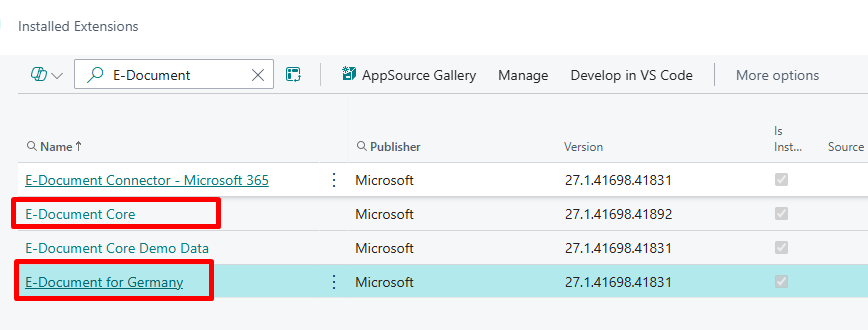
- Make sure the E-Documents apps for Germany (E-Document Core + E-Documents for Germany) are installed.
2. Create an E-Document Service for selected format
- Go to E-Document Services (
Tell me→ E-Document Services). (Set up e-documents) - Choose New and fill in:
- Code / Description – e.g.
XRECHNUNGorZUGFERD. - Document Format – choose XRechnung or ZUGFeRD.
- Service Integration – None
- On the Export FastTab turn on Buyer Reference Mandatory and choose where it comes from (Your Reference or Customer Reference) according to your customers’ requirements. (Use buyer reference on the E-invoice)

3. Configure the E-Document workflow
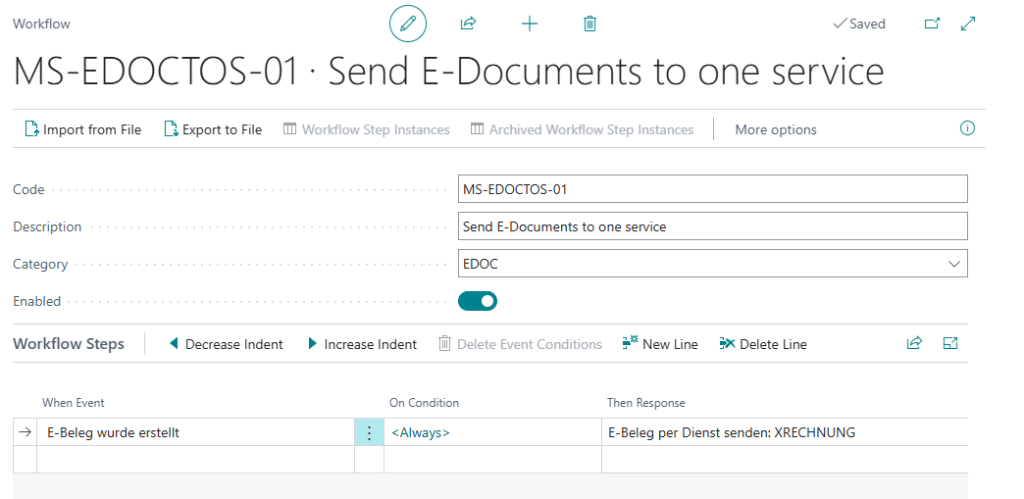
- Go to Workflow Templates, reset Microsoft templates if needed, and look for E-Document Workflow templates.
- Create a new workflow from the template (Send to one service).
- On the workflow lines:
- In Then Response, choose Send E-Document using setup and point it to the correct E-Document Service (xRechnung or ZUGFeRD).
- Enable the workflow.
4. Set up a Document Sending Profile
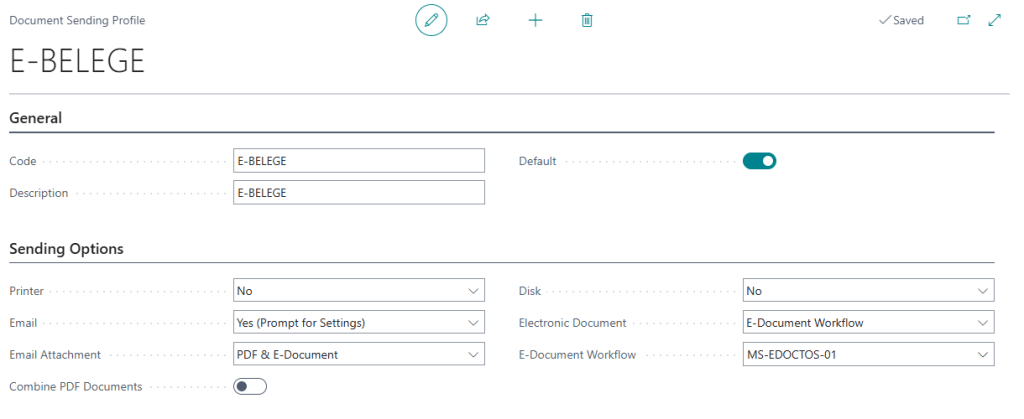
- Go to Document Sending Profiles.
- Create (for example)
EDOC_XRECHNUNGorEDOC_ZUGFERD. - On Sending Options:
- Set Electronic Document to Extended E-Document Service Flow.
- Pick the E-Document Workflow you have created in the previous step.
- Enable Email and set E-Mail Attachment to
E-DocumentorPDF & E-Documentif you want to email the XML/PDF as well.
- Set one of these sending profiles as Default or assign them per customer on the Customer card.

5. Test the setup
- Create a Sales Invoice for a customer that uses your new sending profile.
- Post it, then choose Post and Send.
- Business Central should:
- Create an E-Document for the invoice.
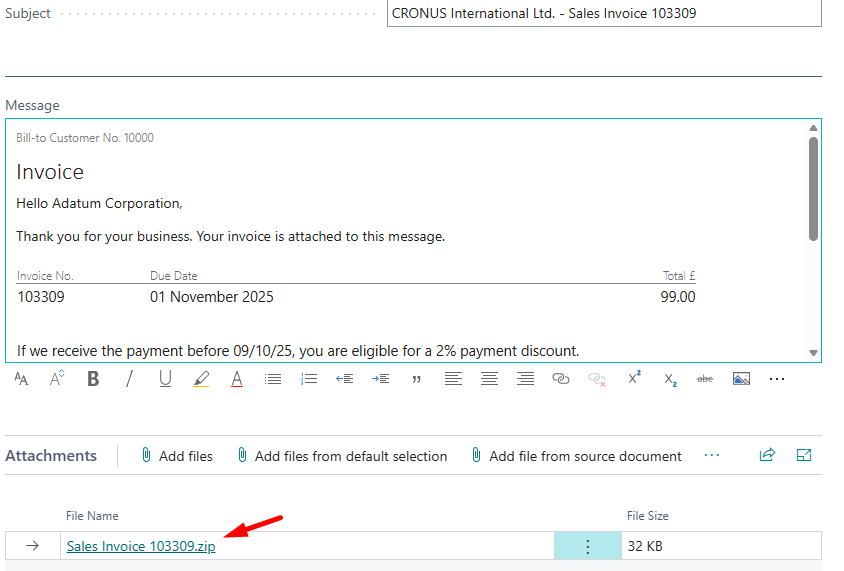
- Run E-Mail Editor and attach xRechnung XML or a ZUGFeRD PDF with embedded XML
- Later, you can open the posted invoice → Related → E-Document → Open to inspect the E-Document log and download the file for your validator.

Call to action – please try xRechnung & ZUGFeRD
If you’re a partner, ISV, or customer working with German e-invoicing, I’d really like to invite you to:
- Set up a sandbox with the German localization and enable E-Documents with xRechnung and/or ZUGFeRD.
- Run your real-world scenarios through it – discounts, master data edge cases, different validators, subscription scenarios, and so on.
- When you see something odd:
- open an issue in the relevant GitHub repo (BCApps), and
- feel free to reference any of the issues I listed above so we can connect the dots.
The more feedback we feed back into the standard apps now, the smoother life will be for everyone once B2B e-invoicing is simply “how we do invoices.”


Close to the scenario with the case where a valid ZUGFeRD PDF was sent with a
.xmlextension and the wrong MIME type I experienced another issue. In case the report ID for the posted invoice is not standard Microsoft, the report gets created but the Factur-X.xml is not embedded. Microsoft forgot about handling custom reports.LikeLike
Luckily, Kilian got this topic covered. It is just a question of time when this change will reach the official release:
ZUGFeRD Export with custom reports by pri-kise · Pull Request #29255 · microsoft/ALAppExtensions · GitHub
LikeLike
Do I understand this correctly that we can currently only use XRechnung or ZUGFeRD for sending?
e.g. how can we setup XRechnung for one customer and ZUGFeRD for other customers?
LikeLike
To my knowledge, it’s not currently possible to configure XRechnung for one customer and ZUGFeRD for another. The limitation lies in how workflows are structured in BC: only one workflow reacting to E-Document creation can be active in Sales at a time, and whichever workflow you assign to a Sending Profile will process either a single E-Document service or all services defined in that workflow — applied uniformly.
Per-customer format selection would require either a code extension or a future platform improvement.
LikeLike
I have to correct myself. It is possible to setup xRechnung for one sending profile and ZUGFeRD for another one. The approach is to use two workflows, but each filtered on a different sending profile.
LikeLike
Hi, do you have any information about the following validation errors for ZUGFeRD?
Seems it must be urn:cen.eu:en16931:2017.
Version in the XMP metadata is 1 instead of 1.0.
LikeLike
Hi Alexander, thanks for the report — I looked into the AL source, and the two errors have very different causes.
1. The profile ID
This one is not really a bug, but it is a real limitation. BC’s ZUGFeRD export writes
xrechnung.xmlas the attachment name together with the guideline IDurn:cen.eu:en16931:2017#compliant#urn:xeinkauf.de:kosit:xrechnung_3.0. That pair is exactly the XRECHNUNG profile defined in the ZUGFeRD 2.3 specification — so what BC produces is XRechnung 3.0 CII wrapped in a PDF/A-3, not the ZUGFeRD EN 16931 (Comfort) profile.So the first thing to check is which profile your validator was set to. If it validated the file as Factur-X / ZUGFeRD EN 16931, it will of course reject that ID and demand the plain
urn:cen.eu:en16931:2017. Validate it as XRechnung 3.0 CII (KoSIT validator, or the e-Rechnungsvalidator with the XRechnung 3.0 CII scenario) and the profile ID is fine.The genuine limitation: the ID is hardcoded in two places in the export codeunit, with no setup field and no event to override it. There is no way to make BC emit a plain EN 16931 ZUGFeRD file if a recipient insists on that profile.
And this is likely also where the “Das XML ist nicht valide” part comes from. Declaring the XRechnung profile activates the KoSIT Schematron, which is considerably stricter than plain EN 16931 — mandatory seller contact (BG-6), buyer reference (BT-10), valid units of measure, and so on. The same XML would very probably pass as plain EN 16931, so it is worth checking the individual rule IDs in your validation report rather than the overall verdict.
2. XMP
Version= 1 instead of 1.0This one is not in the localization app at all. The German e-document app never writes XMP metadata — it only hands the XML to the platform as a PDF attachment, and the platform then renders the PDF/A-3 and generates the whole XMP block, including
fx:Version. Factur-X/ZUGFeRD requires1.0there, so the value you are seeing is a platform-side defect.Practical consequence: it cannot be fixed in the German localization or by a PR against BCApps — it needs a support ticket to Microsoft against the PDF rendering.
LikeLike
A colleague of mine reported this issue with the xmp metadata, too.
This needs to be fixed by the platform.
Maybe the platform will provide options to specify more details for the xmp metadata on the application layer in the future.
I don’t know what the current progress is.
I would suggest to ask for more details on viva engage.
LikeLike
Hi Alexander, a quick update on the XMP part: Microsoft has fixed this in the platform and backported it to BC27, BC28 and BC29, so it will arrive as a platform hotfix over the coming weeks. It already validates on Insider builds.
After the update, the conformance level in the XMP follows the name of the embedded XML, so xrechnung.xml will be declared as XRECHNUNG and match the profile in the XML. The platform will also allow setting the conformance level explicitly, but exposing that to AL is a follow-up.
If you still get errors on an updated environment, please let me know your BC version.
LikeLike
I just found out that advance payment invoices (prepayment = true) aren’t actually taken into account in the standard process. Do you already have any information on this?
LikeLike
I know they are not covered in the standard XRechnung and ZUGFeRD module, but they are also problematic in standard E-Documents module. This is from my point of view a new topic for fixing.
LikeLike
Hello everyone,
1.For ZUGFeRD credit notes, an alternative delivery address is not correctly transferred to the XML. In
ram:ShipToTradeParty, the buyer/customer address is output again instead of the actual delivery address.2.For collective invoices/normal invoices, the delivery dates are reported at line level via BG-26 (BT-134/BT-135) using the goods shipment date. However, at document level, BT-72 (Actual Delivery Date) is populated with the invoice/posting date (Work Date). In addition, it is functionally unclear whether the goods shipment date always corresponds to the actual delivery or service date. We are gradually seeing an increasing number of customers whose invoice recipients are rejecting electronic invoices because the topic of BT-72 / BG-26 (BT-134/BT-135) is not being mapped correctly in the e-invoice, particularly in conjunction with Section 14 (4) No. 6 of the German VAT Act (UStG).
3.Supporting documents accompanying the invoice, such as service reports or proof-of-service documents, should be embedded directly into the structured electronic invoice. Based on current testing, this functionality works with Peppol and XRechnung, but not with ZUGFeRD. Providing these documents as separate email attachments does not meet customer requirements in all scenarios, as recipients often expect all relevant supporting documents to be included within the electronic invoice itself.
4.When creating an electronic invoice from a service invoice or service credit memo, a date field in the XML is populated with the SQL minimum date although no business-relevant date exists. According to the reported issue, node 17530101 is affected. The technically defaulted value is included in the generated XML and causes validation errors at invoice recipients, as the date is interpreted as an invalid business value instead of being omitted when no date is available.
LikeLike
Hi Marcel, thanks for the detailed list. I went through all four points in the code:
I’ll post the links here once the issues are created.
LikeLike
about the date.
the following PR might solve the issue that prevents empty dates being exported
https://github.com/microsoft/BCApps/pull/13675/changes
LikeLike
Hello everyone,
1.For ZUGFeRD credit notes, an alternative delivery address is not correctly transferred to the XML. In
ram:ShipToTradeParty, the buyer/customer address is output again instead of the actual delivery address.2.For collective invoices/normal invoices, the delivery dates are reported at line level via BG-26 (BT-134/BT-135) using the goods shipment date. However, at document level, BT-72 (Actual Delivery Date) is populated with the invoice/posting date (Work Date).
In addition, it is functionally unclear whether the goods shipment date always corresponds to the actual delivery or service date.
We are gradually seeing an increasing number of customers whose invoice recipients are rejecting electronic invoices because the topic of BT-72 / BG-26 (BT-134/BT-135) is not being mapped correctly in the e-invoice, particularly in conjunction with Section 14 (4) No. 6 of the German VAT Act (UStG).
3.Supporting documents accompanying the invoice, such as service reports or proof-of-service documents, should be embedded directly into the structured electronic invoice.
Based on current testing, this functionality works with Peppol and XRechnung, but not with ZUGFeRD. Providing these documents as separate email attachments does not meet customer requirements in all scenarios, as recipients often expect all relevant supporting documents to be included within the electronic invoice itself.
4.hen creating an electronic invoice from a service invoice or service credit memo, a date field in the XML is populated with the SQL minimum date although no business-relevant date exists.
According to the reported issue, node 17530101 is affected. The technically defaulted value is included in the generated XML and causes validation errors at invoice recipients, as the date is interpreted as an invalid business value instead of being omitted when no date is available.
LikeLike
Hi Miljan,
I think what you’re doing is great, and I was hoping you might be able to help with a specific issue I’m facing.
I’m currently implementing the E-Document purchase process in Business Central and have problems with automatic purchase order linking for ZUGFeRD and XRechnung documents.
According to Microsoft’s documentation:
Use e-documents in the purchase process
Business Central should be able to automatically link an incoming e-document invoice to an existing purchase order when the invoice contains the purchase order reference.
My scenario is:
We create and send Purchase Orders to vendors.
Vendors confirm the order and deliver the goods.
We receive the invoice electronically.
The invoice contains our Purchase Order Number.
Business Central should automatically identify and link the invoice to the corresponding PO.
However, with ZUGFeRD and XRechnung, BC always displays the page where the user must manually select one of the vendor’s open purchase orders. Automatic linking never occurs.
What makes this confusing is that:
I have configured automatic invoice intake through Outlook and E-Document Services.
The import process and job queue are working correctly.
When I inspect the XML, I can clearly see the Purchase Order reference present.
Despite this, the Purchase Order No. field is not populated during extraction.
Automatic linking therefore never happens – document stays In Progress, when i click i get prompted the same page to select one open document.
As a comparison, I tested the exact same process using PEPPOL BIS 3.0 DE, and in that case automatic PO linking works correctly.
So my question is:
Have you ever encountered a situation where the Purchase Order reference exists in the ZUGFeRD/XRechnung XML, but Business Central does not extract it and therefore cannot perform automatic PO linking?
Any insight into where BC reads and maps the PO reference for these formats would be greatly appreciated.
Thanks in advance!
LikeLike
Hi Arianit, thanks, and good catch. With Import Process Version 1.0 on the E-Document Service, the PEPPOL import fills the order number, while the XRechnung and ZUGFeRD imports don’t. That matches what you see: PEPPOL links automatically and the other two ask you to select the order. I’ll open a bug for this.
From BC29.0, XRechnung and ZUGFeRD can use Import Process Version 2.0, which reads the order reference and looks up the purchase order with it. The reference must be exactly the BC purchase order number. I checked this in the code but haven’t run it end to end, so please try it in a sandbox first.
LikeLike
Hey Miljan, i tested the import and it was terrible…. There are three main issues with E-Document Import Process Version 2.0. First, importing a ZUGFeRD document via “New from File” fails with the error “No method was provided to structure the received E-Document.” Second, in BC 29.0, purchase order matching was possible, but the resulting purchase invoice did not retain a reference to the matched purchase order. Third, in BC 29.1, the situation has regressed further because the purchase order matching actions are disabled, so the matching process cannot be performed at all.
LikeLike
Thanks for testing this, that is very useful. I checked your three points in the code:
So Version 2.0 is not yet a full replacement for automatic order linking.
LikeLike
Hi Miljan, regarding point 2:
The main problem I see is that although the imported e-invoice goes through purchase order/receipt line matching before the purchase invoice is posted, the resulting purchase invoice does not retain a proper reference to the original purchase order lines.
Therefore, the corresponding purchase order lines remain marked as not invoiced, and the purchase order stays open.
This also introduces an additional risk: since the purchase order lines are still considered uninvoiced, it would technically still be possible to invoice the purchase order again, potentially resulting in duplicate invoicing.
Regarding point 3:
My expectation would be that some kind of matching is performed here as well. However, if matching is generally not intended for this scenario, that is fine.
Nevertheless, the same issue as described in point 2 still remains: there is no proper link to the original purchase order lines. As a result, the purchase order lines remain uninvoiced and the purchase order stays open, which also means that the purchase order could potentially be invoiced again.
LikeLike
Thanks, that clarifies it. I checked the posting code: when the invoice is posted, the purchase order is updated as invoiced only for matches that go through a posted receipt line. If an invoice line is matched to an order line only, without a receipt, the order line stays uninvoiced and the order stays open, which is exactly the duplicate invoicing risk you describe.
Were the order lines already received when you matched them, and did you use “Specify receipt lines” or “Receipt on Invoice”? If the goods were received and it still didn’t update the order, that would be a clear bug and I’d report it.
LikeLike
Hey Miljan, yes, the goods receipt had already been posted, which is why I was quite surprised that it couldn’t find the reference to the purchase order.
LikeLike
Thanks, that’s an important detail. With a posted receipt, finishing the draft should also link the invoice lines to the receipt lines automatically, and posting should then mark the order lines as invoiced, so what you see looks like a bug. Could you tell me the exact BC version (29.0 or 29.1 and the build), and whether you matched the lines with “Match to order lines” only or also with “Specify receipt lines”? With that I can reproduce it and report it to Microsoft.
LikeLike
Hey Miljan, the BC Version was : Version: DE Business Central 29.1 (Plattform 29.0.58354.0 + Anwendung 29.1.57326.58624). An i actually did both the “Math to order” and “with the shipment lines”.
LikeLike
Hey Miljan, I also came across an interesting point regarding the sending of e-invoices. In Germany, it is quite possible that some end customers are too small to have a VAT ID or a GLN. However, we can currently only generate an e-invoice if either a VAT ID or a GLN is maintained for the customer. What would be the best way to handle such a case?
LikeLike
Good question. The check that requires a GLN or VAT registration number is shared by XRechnung and ZUGFeRD. Today it can be satisfied in three ways:
For a small customer without any of these, there is currently no standard way around it. As far as I know, EN 16931 only requires the buyer’s VAT ID for reverse charge and intra-community supplies, and the buyer’s electronic address in these formats is the e-mail, so I think the check is stricter than it needs to be. I’ll look into reporting this to Microsoft.
LikeLike
Hi Miljan,
We have the same issue in our DE environment – Zugferd and X-invoices for businesses without a VAT number.
Legal information:
– A VAT number is not required for domestic German invoices.
– A VAT number is required for reverse-charge transactions.
In our PROD_DE environment, this affects ~7.5k customers who do not have a VAT number.
The pressure is extremely high, given the deadline of 1 January 2027.
Either the field must be filled in correctly with a valid VAT number, or it must be omitted.
LikeLike
We have the same issue in our DE environment – Zugferd and X-invoices for businesses without a VAT number.
Legal information:
A VAT number is not required for domestic German invoices.
A VAT number is required for reverse-charge transactions.
In our PROD_DE environment, this affects ~7.5k customers who do not have a VAT number.
The pressure is extremely high, given the deadline of 1 January 2027.
Either the field must be filled in correctly with a valid VAT number, or it must be omitted.
LikeLike
Hi Sarah, thanks, the number of affected customers really helps make the case. You’re right about the legal side: German VAT law and EN 16931 only require the buyer’s VAT ID for reverse charge and intra-community supplies. For a domestic invoice it can simply be left out.
I reported this to Microsoft in microsoft/BCApps#13922. Their answer is that the check will stay in place, but they will make it extensible, so an extension can skip it where it isn’t needed. That change hasn’t been released yet. A related issue, microsoft/BCApps#14116, aligns the XRechnung/ZUGFeRD checks with what the export actually writes for the buyer’s electronic address.
What you can do today:
If you add a short comment with your numbers and the 1 January 2027 deadline on microsoft/BCApps#13922, that helps Microsoft prioritize it.
LikeLike
Hi Milan, thank you for having me and for contributing to this blog. I would also appreciate your advice on the point below.
In Germany, when we have an invoice line with VAT category O (“Not subject to VAT”), corresponding to the No Taxable VAT calculation type in Business Central, BC still outputs a 0% VAT rate at line level:
<ram:RateApplicablePercent>0</ram:RateApplicablePercent>
However, according to the rule below, if the VAT category code (BT-151) is “Not subject to VAT”, the invoice line (BG-25) should not contain an Invoiced Item VAT Rate (BT-152) at all.
Do you know how I could remove this line from the XML output?
LikeLike
Hi Namig, you’re right: BR-O-05 requires BT-152 to be absent for category O, and a 0 is not enough. XRechnung already omits it on lines, but ZUGFeRD writes it unconditionally. This is reported in microsoft/BCApps#13947 (approved, a fix for 29.1 is in review), together with microsoft/BCApps#13948 for the VAT identifiers that BR-O-02 forbids on such documents.
LikeLike