
In the last few weeks, I’ve spent quite some time in the German e-invoicing corner of Business Central – specifically around the xRechnung and ZUGFeRD formats that Microsoft ships on top of the E-Documents framework.
These formats are strategically important. With B2B e-invoicing becoming mandatory in Germany in phases from 2025 onwards, and formats like xRechnung and ZUGFeRD explicitly listed as compliant EN 16931 syntaxes, quality matters a lot more than “it usually works”.
The good news: Microsoft has done the heavy lifting by delivering standard apps for xRechnung and ZUGFeRD in Business Central.
The less good news: in real-world usage, a number of small but important issues show up – things that make validators unhappy, confuse users, or simply get in the way of partners rolling this out at scale.
So, I decided to help polish these modules by opening issues (and preparing pull requests) in the ALAppExtensions and BCApps GitHub repos. Below is a short overview of what has been worked on and why it matters.
What has been fixed / worked on so far
- Buyer Reference check – Limit Buyer Reference mandatory validation to sales e-documents so posting purchase documents no longer throws “Customer does not exist”.
→ #29257, #29294 – included in BC27.2
→ Follow-up: the original fix introduced a new bug, tracked in #29423. – included in BC27.2 - Invoice and line discount precision – Keep full discount % precision in xRechnung XML so totals match Business Central and pass validators.
→ #29253 – included in BC27.4 - Mandatory customer data – Catch missing mandatory customer data before posting avoiding invalid xRechnung file.
→ #29264 – included in BC27.1 - Better extensibility – Add hooks /
IsHandledso partners and ISVs can override line mapping and add extra fields in xRechnung / ZUGFeRD without forking the whole implementation.
→ #29314 – included in BC27.1 - ZUGFeRD file type – Fix the case where a valid ZUGFeRD PDF was sent with a
.xmlextension and the wrong MIME type.
→ BCApps #5220 – included in BC27.3 - “Embed PDF in export” flag – Make the flag actually embed the PDF for xRechnung.
→ #29414 – included in BC27.3
→ Follow-up: the original fix incomplete, tracked in #29665. – included in BC27.5 - Customer email in ZUGFeRD – Export customer email into the correct ZUGFeRD XML node to satisfy popular validators.
→ #29420 – included in BC27.3 - By Kilian@Prisma Informatik GmbH:
ZUGFeRD Export for custom reports – Enabling ZUGFeRD export for custom reports.
→ #29255 – included in BC27.2
→ Follow-up: the original approach required too much manual wiring; this simplifies integrating the ZUGFeRD XML into custom reports, tracked in #29541. – included in BC27.5 - By Kilian@Prisma Informatik GmbH:
Use Responsibility Center address + Salesperson as contact in ZUGFeRD/xRechnung export (same sourcing as Peppol).
→ #29482 – included in BC27.4 - Customer specific checks / pre-release validation extensibility – Add an
OnAfterCheckhook to the xRechnung and ZUGFeRD so ISVs/end-customers can run additional validations prior to document release.
→ #29583 – included in BC28.0 - Shipment Date aligned with printout (line-level export) – Additional export Shipment Date per invoice line (instead of only header-level) so the generated xRechnung/ZUGFeRD matches the Posted Sales Invoice printout.
→ #29593 – included in BC27.5 Hotfix - By Kilian@Prisma Informatik GmbH:
Correct Bank Values in XRechnung – Updated the XRechnung export to use IBAN and SWIFT code instead of the Bank Account No to ensure compliance.
→ #29706 – included in BC27.5 Hotfix - By Kilian@Prisma Informatik GmbH:
Mapping for Payment Means – Added the ability to map internal payment methods to specific electronic payment means codes (e.g., SEPA).
→ BCApps #9047 – developed, merging to BC28.x pending - By Kilian@Prisma Informatik GmbH:
ZUGFeRD XML filename for XRechnung – Fixed the filename of the embedded XML to bexrechnung.xml(instead offactur-x.xml) when the XRechnung profile is used within ZUGFeRD.
→ #29716 – included in BC28.3 - By Kilian@Prisma Informatik GmbH:
New formatting events – AddedOnAfterFormatDecimal,OnAfterFormatFourDecimal, andOnAfterFormatFiveDecimalintegration events to allow partners to customize the text representation of numeric amounts.
→ #29717 – included in BC27.5 Hotfix - By Kilian@Prisma Informatik GmbH:
Omit empty contact in ZUGFeRD – Ensured that the optionalPersonNamenode is omitted from the XML if the contact person is empty, avoiding validation errors.
→ #29718 – included in BC28.3 - VAT Registration No. for Public Sector – Updated the validation logic to allow B2G transactions without a VAT Registration Number if a valid E-Invoice Routing No. (Leitweg-ID) is provided.
→ #29744 – included in BC27.5 Hotfix - Quantity precision in XRechnung – Support unlimited decimal places for the
Quantity in XRechnung to prevent calculation mismatches and validation failures.
→ #29745 – included in BC27.5 Hotfix - By Kilian@Prisma Informatik GmbH:
ZUGFeRD IBAN and SWIFT from Company Bank Account – Fixed the ZUGFeRD export to source the IBAN and SWIFT Code from the “Company Bank Account” instead of using incorrect or missing values.
→ #29775 – included in BC28.3 - By Kilian@Prisma Informatik GmbH:
XRechnung Service Document Attachments – Fixed an issue where document attachments were not correctly exported for Service documents in the XRechnung format.
→ #29788 – included in BC28.3 - By Kilian@Prisma Informatik GmbH:
XRechnung attachment filter extensibility – Added anOnInsertAttachmentOnAfterSetFiltersevent so partners can control which document attachments are included in the xRechnung export.
→ #29799 – included in BC28.3 - By Kilian@Prisma Informatik GmbH:
Skip unsupported MIME types in XRechnung attachments – The xRechnung export now gracefully skips document attachments whose MIME type is not supported instead of producing an invalid XML.
→ #29823 – included in BC28.3 - Missing TaxExemptionReason and unsupported VATEX codes – Fixed the xRechnung/ZUGFeRD export to include
TaxExemptionReason(BT-120) andTaxExemptionReasonCode(BT-121) for exempt VAT categories.
→ #29863 – included in BC28.3 - ZUGFeRD: Seller Item Number (BT-155) missing from XML export –
ram:SellerAssignedIDwas omitted at line level despite the data being available (already exported correctly in XRechnung). → #29871 – included in BC28.2 - By Kilian@Prisma Informatik GmbH:
ZUGFeRD: Seller Order Reference (BT-14) missing + extensibility event – The seller’s internal order reference was not exported when an invoice was created from a sales order. Also adds anOnAfterInsertApplicableHeaderTradeAgreementevent for partner extensions. → #29892 – included in BC28.3 - By Kilian@Prisma Informatik GmbH:
ZUGFeRD: LineTotalAmount incorrect on multi-line invoices –LineTotalAmountwas not summing all lines, causing BR-CO-10 validation failures. → #29923 – included in BC28.1 - By Kilian@Prisma Informatik GmbH:
XRechnung credit note:InvoicePeriodplaced incorrectly –InvoicePeriodwas placed underCreditNoteLine, which is not permitted by UBL 2.1, causing schema validation failures. → #29928 – included in BC28.1 - By Kilian@Prisma Informatik GmbH:
Buyer Reference (BT-10 / Leitweg-ID): incorrect source and inconsistent handling – Extends #29868: adds a document-level Buyer Reference field pre-populated from Bill-to Customer, carried through posting, and resolved consistently across PEPPOL BIS 3.0 DE, XRechnung and ZUGFeRD. → #29921 – included in BC28.3 - FindEDocumentService always selects last matching service – When multiple E-Document Services share the same document format (e.g. two XRechnung services — one with embedded PDF, one without), the system always picks the last service in the list, ignoring which service actually triggered the export.
→ BCApps #8414 – developed, merging to BC28.x pending - Missing posting-time validation for SELLER CONTACT (BG-6) – If the Salesperson assigned to a document (or Company Information when no Salesperson is set) is missing Name, Phone No., or E-Mail, the document posts and exports invalid E-Document. Business Central should block posting with a clear error naming the missing field.
→ BCApps #8416 – developed, merging to BC28.x pending - Item Charge lines exported without a valid unit of measure code – Item Charge lines are exported as regular invoice lines but carry either an empty unit code or
PCEon BT-130, both of which fail EN16931 / XRechnung validation. The correct fix is to emitC62(“one”) as the UN/ECE Rec 20 unit code for charges that have no physical unit.
→ BCApps #8417 – developed, merging to BC28.x pending - By Kilian@Prisma Informatik GmbH:
Wrong IssueDate (BT-2) in XRechnung/ZUGFeRD export – The export used the Posting Date as the invoiceIssueDateinstead of the Document Date, so the date written to the XML could differ from the printed invoice and trip up validators and recipients. Fix makes the export use the Document Date.
→ BCApps #8904 – developed, merging to BC28.x pending - Incoming purchase document creation fails – “You cannot insert a purchase line without a purchase header” – When importing incoming XRechnung or ZUGFeRD vendor invoices, the E-Document imports fine, but Create Document ends in an error and no purchase lines are generated.
→ BCApps #9589 – included in BC28.3 - Line discount precision regression (>2 decimals) breaks EN16931 – A regression of the earlier BC27.4 fix: when a sales line has a Line Discount % with more than 2 decimals (e.g.
0.26103), the export writescbc:MultiplierFactorNumericrounded to 2 decimals while the discount amount is still calculated from the full value. The mismatch betweenMultiplierFactorNumeric,BaseAmountandAmountmakes the invoice fail EN16931 validation. Affects both XRechnung and ZUGFeRD. Re-opens the ground covered by #29253.
→ BCApps #9592 – developed, merging to BC28.x pending
Status – where we are now
All of the topics above are backed by GitHub issues in the ALAppExtensions and BCApps repos, and for most of them I’ve already prepared or am preparing pull requests with concrete fixes.
Some changes are still under discussion, some are already accepted, and others are waiting in Microsoft’s internal pipeline. In other words: the groundwork is there, but the final word on shipping dates and exact releases is, of course, up to Microsoft.
My goal with these contributions is simple: close the gap between “it works in a demo” and “it survives real German e-invoicing projects, validators, and auditors.”
How to set up xRechnung or ZUGFeRD in Business Central
If you haven’t touched the E-Documents framework yet, the basic setup for xRechnung and ZUGFeRD follows the same pattern. The German localization supports XRechnung (UBL), PEPPOL BIS 30 DE and ZUGFeRD through the E-Document framework. (Electronic invoicing in Germany)
Below is a “short version” of the steps I usually go through.
1. Prerequisites
- Use a German company / localization.
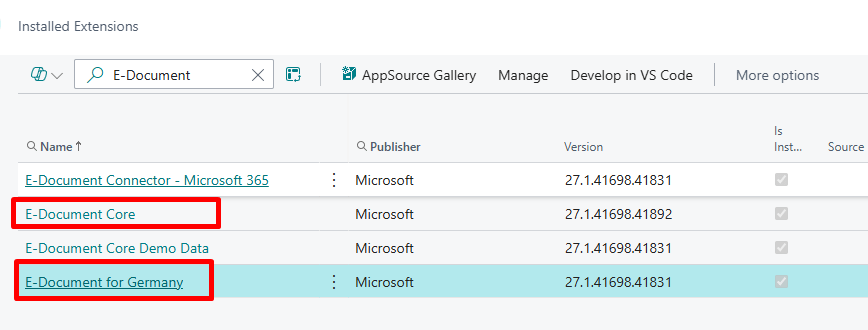
- Make sure the E-Documents apps for Germany (E-Document Core + E-Documents for Germany) are installed.
2. Create an E-Document Service for selected format
- Go to E-Document Services (
Tell me→ E-Document Services). (Set up e-documents) - Choose New and fill in:
- Code / Description – e.g.
XRECHNUNGorZUGFERD. - Document Format – choose XRechnung or ZUGFeRD.
- Service Integration – None
- On the Export FastTab turn on Buyer Reference Mandatory and choose where it comes from (Your Reference or Customer Reference) according to your customers’ requirements. (Use buyer reference on the E-invoice)

3. Configure the E-Document workflow
- Go to Workflow Templates, reset Microsoft templates if needed, and look for E-Document Workflow templates.
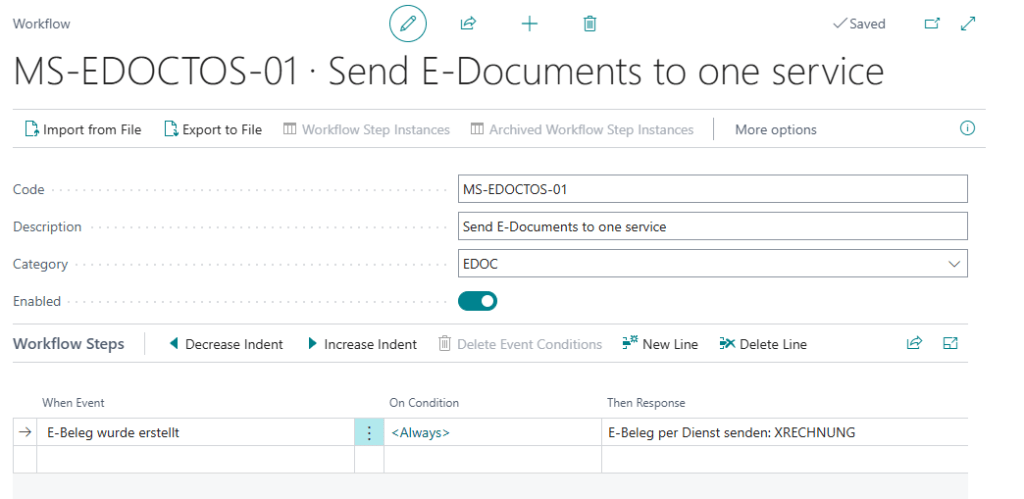
- Create a new workflow from the template (Send to one service).
- On the workflow lines:
- In Then Response, choose Send E-Document using setup and point it to the correct E-Document Service (xRechnung or ZUGFeRD).
- Enable the workflow.
4. Set up a Document Sending Profile
- Go to Document Sending Profiles.
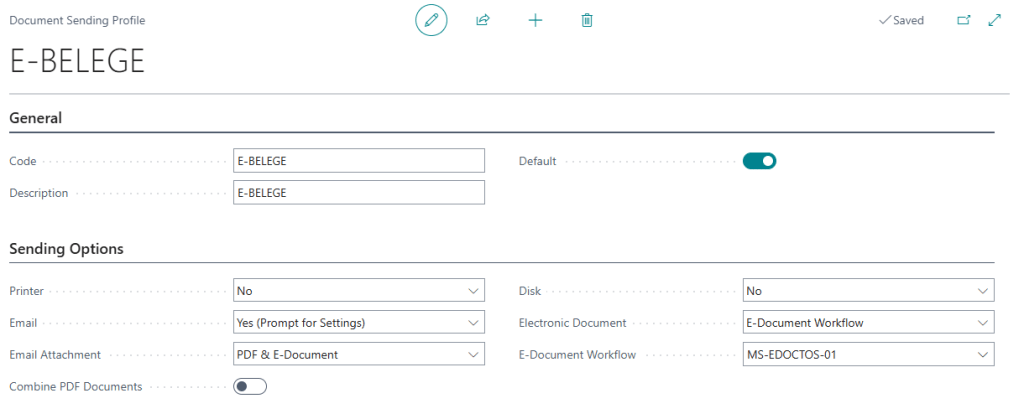
- Create (for example)
EDOC_XRECHNUNGorEDOC_ZUGFERD. - On Sending Options:
- Set Electronic Document to Extended E-Document Service Flow.
- Pick the E-Document Workflow you have created in the previous step.
- Enable Email and set E-Mail Attachment to
E-DocumentorPDF & E-Documentif you want to email the XML/PDF as well.
- Set one of these sending profiles as Default or assign them per customer on the Customer card.

5. Test the setup
- Create a Sales Invoice for a customer that uses your new sending profile.
- Post it, then choose Post and Send.
- Business Central should:
- Create an E-Document for the invoice.
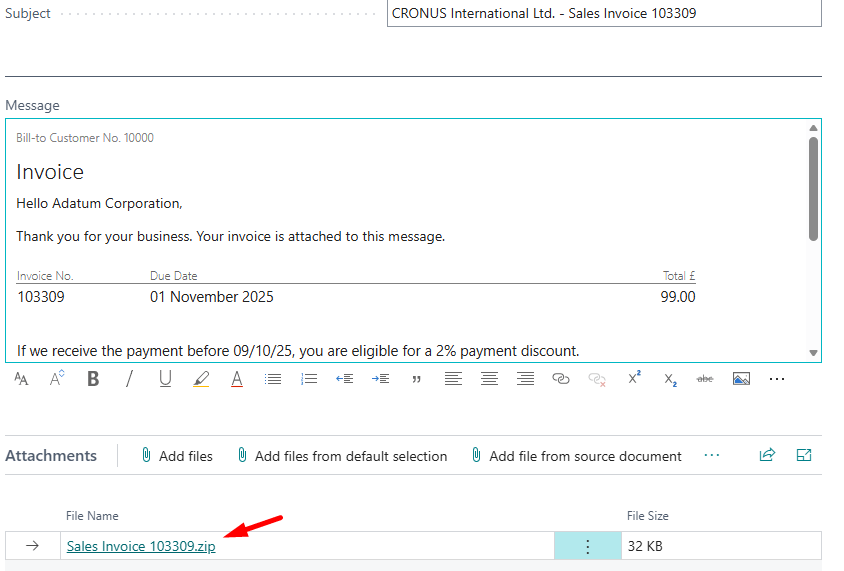
- Run E-Mail Editor and attach xRechnung XML or a ZUGFeRD PDF with embedded XML
- Later, you can open the posted invoice → Related → E-Document → Open to inspect the E-Document log and download the file for your validator.

Call to action – please try xRechnung & ZUGFeRD
If you’re a partner, ISV, or customer working with German e-invoicing, I’d really like to invite you to:
- Set up a sandbox with the German localization and enable E-Documents with xRechnung and/or ZUGFeRD.
- Run your real-world scenarios through it – discounts, master data edge cases, different validators, subscription scenarios, and so on.
- When you see something odd:
- open an issue in the relevant GitHub repo (ALAppExtensions or BCApps), and
- feel free to reference any of the issues I listed above so we can connect the dots.
The more feedback we feed back into the standard apps now, the smoother life will be for everyone once B2B e-invoicing is simply “how we do invoices.”
 Miljan's Blog
Close to the scenario with the case where a valid ZUGFeRD PDF was sent with a
.xmlextension and the wrong MIME type I experienced another issue. In case the report ID for the posted invoice is not standard Microsoft, the report gets created but the Factur-X.xml is not embedded. Microsoft forgot about handling custom reports.LikeLike
Luckily, Kilian got this topic covered. It is just a question of time when this change will reach the official release:
ZUGFeRD Export with custom reports by pri-kise · Pull Request #29255 · microsoft/ALAppExtensions · GitHub
LikeLike
Do I understand this correctly that we can currently only use XRechnung or ZUGFeRD for sending?
e.g. how can we setup XRechnung for one customer and ZUGFeRD for other customers?
LikeLike
To my knowledge, it’s not currently possible to configure XRechnung for one customer and ZUGFeRD for another. The limitation lies in how workflows are structured in BC: only one workflow reacting to E-Document creation can be active in Sales at a time, and whichever workflow you assign to a Sending Profile will process either a single E-Document service or all services defined in that workflow — applied uniformly.
Per-customer format selection would require either a code extension or a future platform improvement.
LikeLike