Every now and then, you hit a very simple need in Business Central:
“I just want a big text box where users can type a longer note and store it safely.”
No rich formatting, no Word integration, no extra tables. Just plain text, saved in a field, opened with a single action.
That’s exactly what this Simple Text Editor for Business Central does. It’s a tiny AL extension that gives you a clean text editor dialog you can reuse on any record that stores text in a BLOB field.
GitHub repo: miljance/SimpleTextEditor
The problem: long text, clumsy experience
Standard text fields are fine for short descriptions. But as soon as you want to keep longer notes or copy-paste from elsewhere you quickly run into limits:
- field length is restricted,
- multi-line fields are still quite cramped,
- and BLOB fields usually mean “export to something, edit, import back”.
Here is a natural flow for users: click an action, an editor opens, type freely, press OK, done.
How it looks in Business Central
1. From the Customer List
On the Customer List, open the Customer action menu and you’ll find Edit Customer Text among the other customer-related actions:
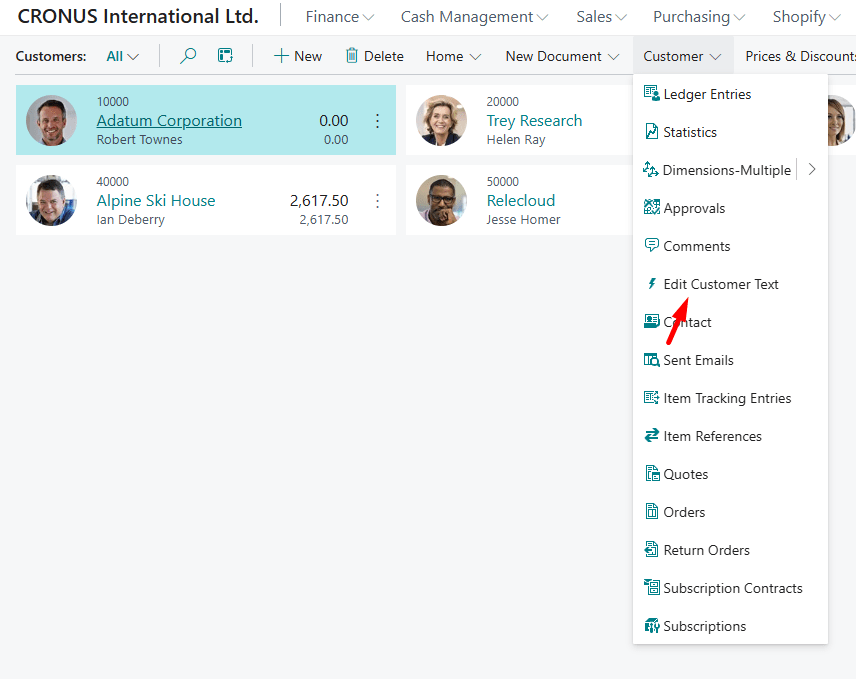
You can open the editor directly from here without even leaving the list.
2. From the Customer Card
On the Customer Card, there is also an Edit Customer Text action in the Customer tab ribbon:
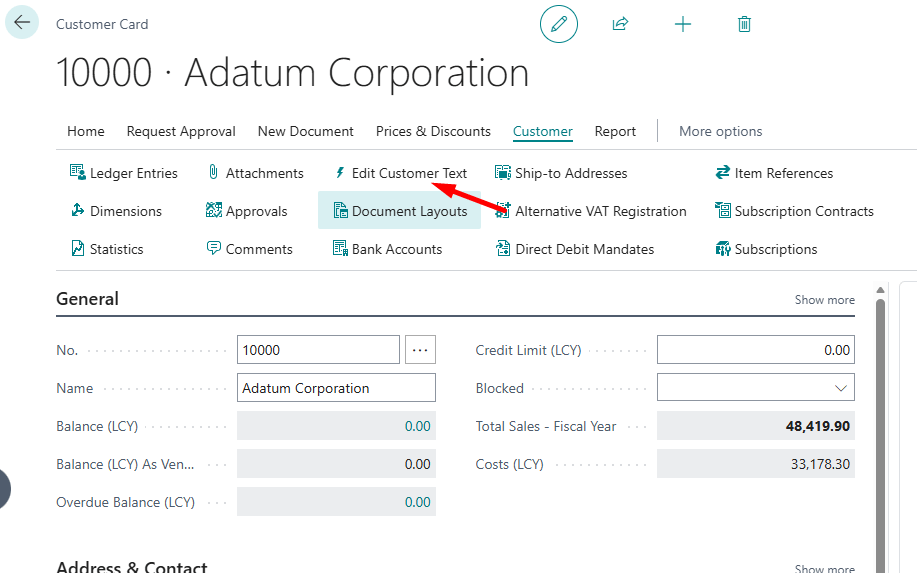
This is usually the more natural place for end users: they open a customer card and edit the text like any other detail.
3. The editor itself
Clicking the action opens a modal dialog with a text area:
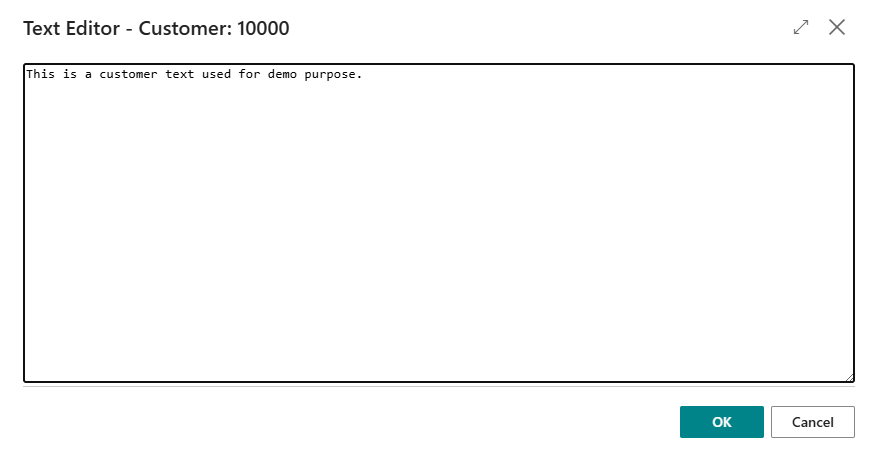
The experience is intentionally minimal:
- a simple text area,
- no formatting controls,
- just type or paste,
- press OK to save or Cancel to ignore changes.
Behind the scenes, the text is stored in a BLOB field on the Customer record, but the user doesn’t need to care about that.
Where you can use it
In the sample app, the editor is wired to the Customer table, as a new “Customer Text” field and two actions on:
- Customer List
- Customer Card
But the idea is completely generic. You can reuse the same pattern for any place where you already use (or plan to use) a BLOB field for text
The README in the repo shows how to hook it up to any BLOB field in three basic steps (add the field, add an action, call the editor).
What this project is – and what it is not
This project is:
- Simple – just a plain HTML
<textarea>hosted through the standardWebPageViewercontrol. - Reusable – built once, usable on any table/field combination.
- Small – only a handful of objects; you can read the whole code in a few minutes.
- Free to reuse – the repo is published as a sample; you can copy it into your own extensions and adjust it as you like.
This extension is not:
- a rich text editor,
- a markdown editor,
- or a full documentation system.
There is no bold/italic, no hyperlinks, no attachments, no images – just text. That’s intentional. The smallest possible building block that solves the “long plain text in a BLOB” problem.
If you need something more powerful
If you actually need rich text (bold, italic, links, etc.), Business Central already has a built-in Rich Text content control that you should use instead of this sample:
Rich Text and content controls
And if you’re looking for a much better plain text editor with things like syntax highlighting and a real code-editor feel, check out Erik Hougaard’s video where he implements an editor based on ACE Editor:
How to edit and view (ascii) data with AL in Business Central
Think of my Simple Text Editor as the minimal, lightweight default—and those two options as the “upgrade paths” when you need more features.
How to try it
If you want to see it in action:
- Clone the repo: miljance/SimpleTextEditor
- Publish it to a sandbox.
- Open Customers in Business Central.
- Use Edit Customer Text from either the list or card.
- Type something, click OK, and open the editor again – the text is stored on the customer.
That’s it. No extra setup, no configuration pages.
Final thoughts
Longer plain text in Business Central still feels a bit underserved. We already have a nice Rich Text control, and I’d really like Microsoft to offer something similar for plain text out of the box.
Until that happens, this small sample is just a practical workaround: it gives you a simple dialog for editing BLOB text with a single action. It’s not meant to be fancy or final—just “good enough” to make everyday work with long text a bit less painful.
If you end up integrating it into your own extensions, let me know – or create an issue on GitHub with ideas for improvements.
👉 Repo: miljance/SimpleTextEditor
 Miljan's Blog